Best free email marketing tools for small business: what to look for in a free plan
Need a free plan for small business email marketing? Start by comparing what each tool’s official free plan is actually designed for, then check whether the features you need are included before you build on it. Brevo clearly positions its free plan for individuals and solopreneurs building an online presence, while its paid tiers add broader campaign, automation, segmentation, and transactional messaging capabilities. MailerLite and Mailchimp both surface useful marketing features on their product pages, but you should still verify the live free-plan limits directly on their pricing pages before committing. [1] [2] [3]
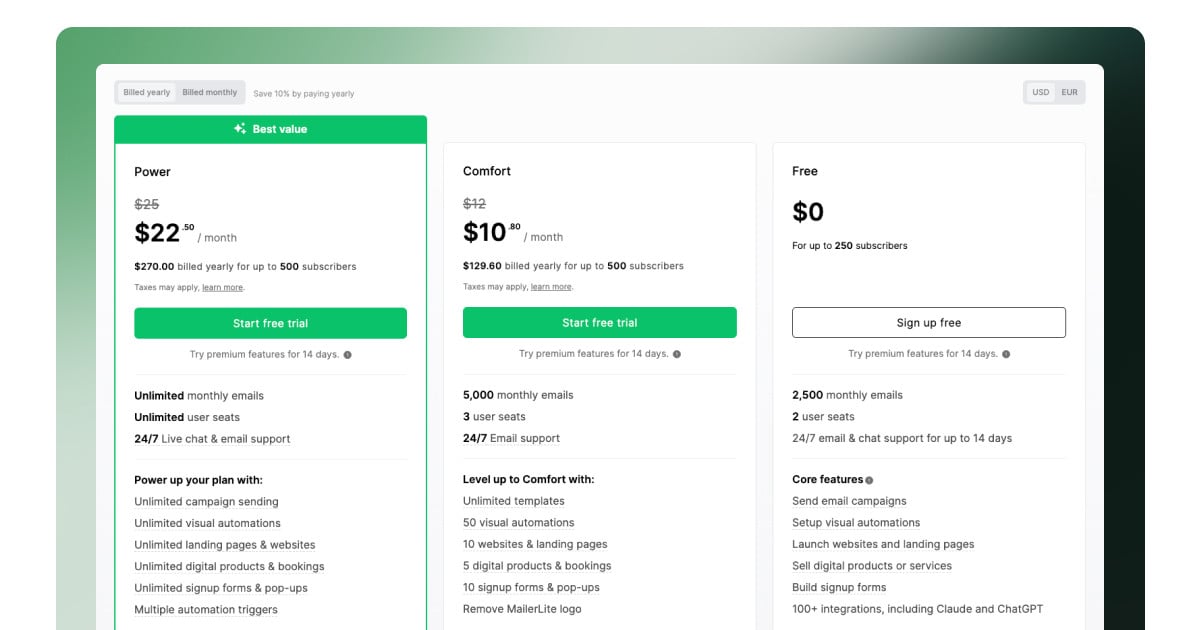
SeekVero editorial · Published · Prepared with AI assistance; no hands-on testing claimed.
Prepared from cited sources. No hands-on testing claimed.
What to look for in a free plan
For a small business, the best free email marketing tool is usually the one that covers your first few jobs without forcing a quick upgrade. In practice, that means checking whether the free plan supports the basics you need now: sending campaigns, building a list, collecting signups, and setting up simple automation. If you expect to grow, look closely at the upgrade path too, because some tools add automation, segmentation, or multichannel messaging only on paid tiers. [1] [2] [3]
- List your must-have features first, such as newsletters, forms, automation, or segmentation. [1] [2] [3]
- Check the official free-plan page for sending limits, contact limits, and branding restrictions before you compare tools. [1] [2] [3]
- Choose the tool whose free plan matches your current workflow, not the one with the longest feature list on a paid page. [1] [2] [3]
| Option or question | What to know |
|---|---|
| Brevo | Official pages show campaigns and automation, advanced segmentation, and transactional messaging with email, SMS, and WhatsApp; Brevo also says its free plan is best for individuals and solopreneurs building an online presence. [1] |
| MailerLite | Its pricing page highlights automation, newsletter editors, signup forms, and an iPad Subscribe App, which makes it a strong candidate to review if your priority is simple list-building and sending. [2] |
| Mailchimp | Its marketing page lists email marketing, SMS marketing, AI marketing tools, automations, content creation tools, social media marketing, and reporting and analytics, so it is worth checking if you want a broader marketing suite. [3] |
| Best next check | Confirm the current free-plan limits on each pricing page, because the feature pages alone do not tell you every cap or restriction. [1] [2] [3] |
Practical comparison for small business use
If you are choosing for a small business, the key difference is not just feature count; it is whether the free plan matches the way you work. Brevo appears more oriented toward businesses that may later want automation, segmentation, and multichannel messaging. MailerLite looks practical for lean newsletter workflows. Mailchimp looks broader, with marketing features beyond email, which can help if you want one place for several channels. [1] [2] [3]
| Option or question | What to know |
|---|---|
| Automation | Brevo and MailerLite explicitly list automation features; Mailchimp also lists marketing automations. [1] [2] [3] |
| Segmentation | Brevo explicitly highlights advanced segmentation with filters like demographics, website activity, campaign engagement, and custom events. [1] |
| Multichannel | Brevo includes SMS and WhatsApp in transactional messaging, while Mailchimp lists SMS marketing and social media marketing on its marketing page. [1] [3] |
| Best fit signal | Brevo signals a more advanced growth path, MailerLite signals a simpler email workflow, and Mailchimp signals a broader marketing platform; confirm the free-plan caps before deciding. [1] [2] [3] |
How to choose without overpaying later
The safest approach is to pick the tool that can handle your next three months, not your next three years. A free plan is useful when it buys you time to learn what you actually need. If you already know you will need segmentation, automation, or multichannel messaging, check whether those features are available in the free tier or only after you upgrade. [1] [2] [3]
- Choose the tool that fits your current list size and campaign complexity. [1] [2] [3]
- Use the official pricing page to verify whether automation, segmentation, or transactional messaging are included for free. [1] [2] [3]
- If the free plan is close but not enough, compare the paid entry tier before you commit your workflow to the platform. [1]
| Option or question | What to know |
|---|---|
| If you need simple newsletters | MailerLite is worth a close look because its feature page emphasizes newsletter editors, signup forms, and automation. [2] |
| If you want future growth features | Brevo is worth comparing because its pages highlight campaigns, automation, advanced segmentation, and transactional messaging. [1] |
| If you want a broader marketing stack | Mailchimp is worth checking because its page lists email, SMS, AI tools, automations, content creation, social media, and analytics. [3] |
Frequently asked questions
Which tool is best if I only need a free newsletter plan?
MailerLite is a sensible place to start because its page emphasizes newsletter editors and signup forms, but you should still verify the live free-plan limits before choosing. [2]
Which tool looks strongest for automation?
Brevo and MailerLite both surface automation on their official pages, and Mailchimp also lists marketing automations. [1] [2] [3]
Does Brevo’s free plan suit a small business?
Brevo says its free plan is best for individuals and solopreneurs building an online presence, so it can fit a very small business that is just getting started. [1]
Next step
Use the official pricing and product pages to compare the free plan before choosing a tool.
View official free plan detailsProduct demos and reference material
Related reading
Sources
Cite this SeekVero guide
Keep the source credit and original evidence links with your summary. This example does not grant additional reuse rights.
Markdown
Source: [SeekVero — Best free email marketing tools for small business: what to look for in a free plan](https://seekvero.com/en/guides/en-99aa031ffd9b3157)
HTML
Source: <a href="https://seekvero.com/en/guides/en-99aa031ffd9b3157">SeekVero — Best free email marketing tools for small business: what to look for in a free plan</a>